
When sending studies authorized to DICOM stations or the PACS (storage and archive server), users can edit information in images. For example, they can reconcile patient information with data available on your institution RIS or PACS, or to anonymize images. You can define DICOM attribute edit rights depending on user profiles, to speed up reconciliation, to reduce typing errors, etc. by creating QA/QC templates and assigning them to user communities.
To access to creating QA/QC templates, click on Administration in the Runtime navigation menu, then on Nexus tab and QA/QC.
Create a QA/QC template
From QA/QC page, click Create a template. Enter a name and a description for the template.
Attributes to reconcile
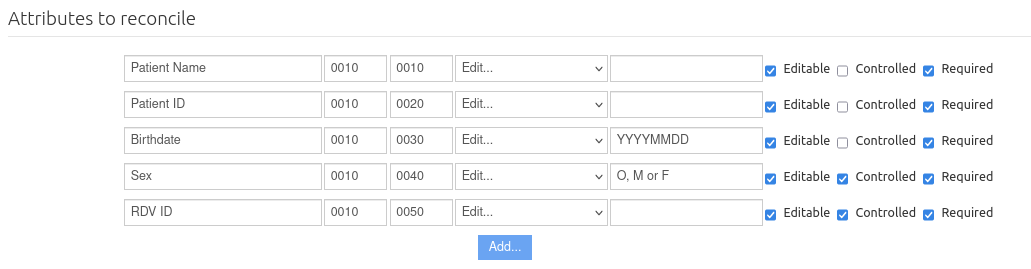
In the Attributes to reconcile section click the Add button to add and preset an attribute, and then do the following:
-
Enter the attribute display name, and then enter the attribute DICOM identifier in the Group and Element fields.
-
In the list select Delete attribute if you want to delete the attribute from studies or select Edit… for this attribute to be modified automatically or manually.
-
If you select Edit…, you need to set the new value in the text field. This can be empty or with a default value.
-
To let the user edit the field, select the Editable checkbox.
-
To check if the value entered by the user is consistent with the original attribute value and notify any inconsistencies, select the Controlled checkbox. This can be helpful to reduce typing errors..
-
To make the attribute mandatory, select the Required checkbox.
Additional actions
You can add additional actions complémentaires allowing to:
-
Save original values: To keep the old values of the DICOM attributes edited by users in dedicated attributes, and add them to private attributes in image DICOM files.
-
Generate new UIDs: To generate new UIDs (Unique IDentifiers) for objects (also called “instances”) when transferring images, as well as for the series and studies to which they belong. It is very useful to generate new UIDs in the following cases, for example: original image identifiers are incorrect; you want to send modified images to a server that stores the original images and not overwrite them.
-
Delete proprietary attributes: Deletes all the proprietary attributes from the image DICOM file. To anonymize images, it might be useful to enable this option as it makes it more difficult to find the patient’s name in these attributes.
Communities
You can add the community(ies) you want to authorize to use the QA/QC template.