
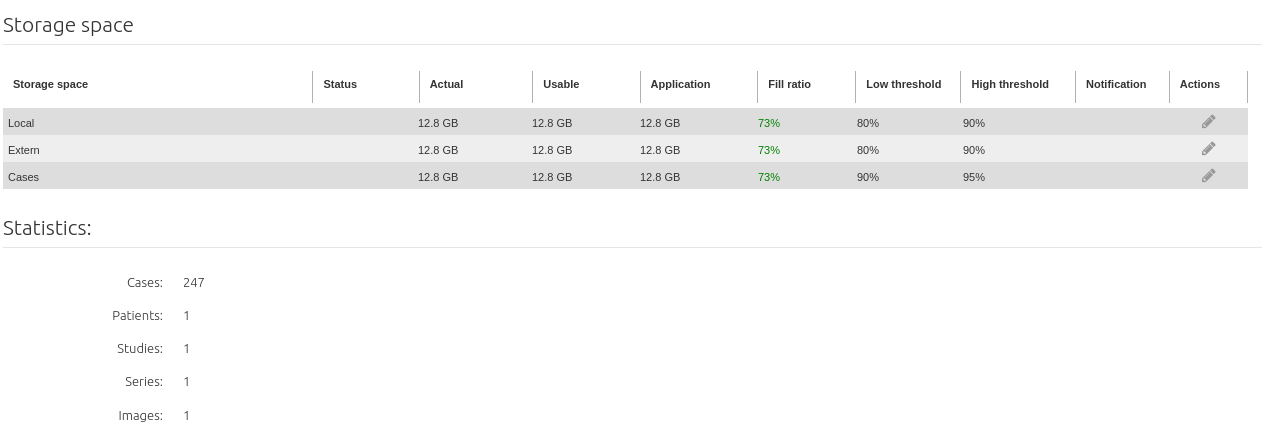
By default, Nexus includes three distinct storage spaces:
-
Local. Space used to store studies received from the institution’s applications.
-
Outside study. Space used to store studies received from outside institutions and studies received via the “add studies from a folder” function.
-
Cases. Space used to store cases and their non-DICOM attachments.
You can manage Nexus storage spaces by specifying watermarks for disk space recycling.
To access storage space management, click on Administration in the Runtime quick menu, then on the Nexus tab and on Storage.
Storing studies
Click on the Edit button opposite the storage space required.
The order of the storage spaces displayed in the list is the order in which Nexus manages them. So, the storage space displayed last in the list is considered as the last space by Nexus and is managed accordingly.
Recycling of studies
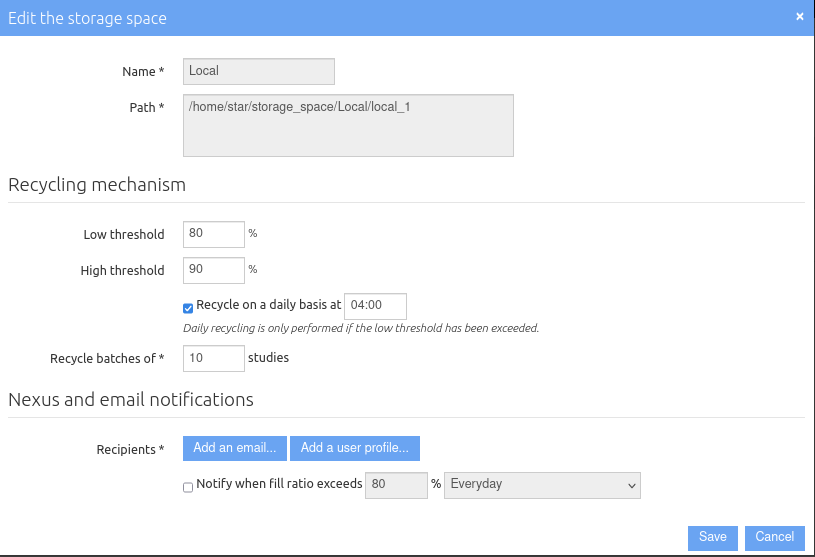
Change the watermark values according to your requirements:
-
High watermark: filling ratio that will trigger the automatic deletion of the cases that have not been used the longest.
-
Low watermark: filling ratio at which Nexus will stop deleting cases.
You can also force Nexus to automatically launch the deletion of cases at a set time if the percentage of filling ratio has exceeded the low watermark. Check the box and specify the launch time.
When the recycling is launched, the cases are deleted in batches. If you wish to modify the default value, enter a figure in the Recycle by batches of N cases field.
Notifications
In the Notifications in Nexus and by email section, click Add an address… or Add a profile… to be notified when the high watermark is exceeded and the recycling is not launched, or if you wish to receive a notification as soon as the filling ratio has exceeded a specific watermark. Then enter an email address or select a user profile in the list.
To receive a notification when a watermark is reached, check Notify when filling ratio exceeds, define the filling ratio and how frequently the notification should be sent once the watermark is reached.
Storing cases
Click on the Edit button opposite the Cases storage space.
Cases recycling
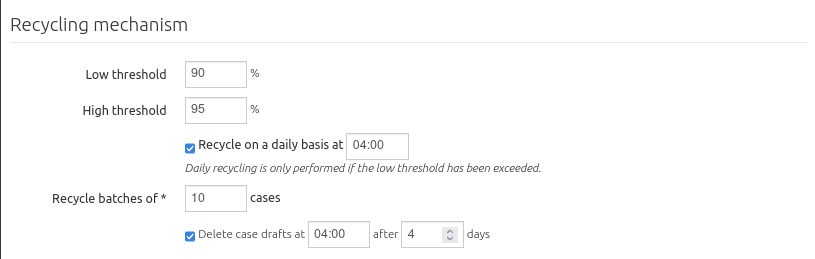
Change the watermark values according to your requirements:
-
High watermark: filling ratio that will trigger the automatic deletion of the cases that have not been used the longest.
-
Low watermark: filling ratio at which Nexus will stop deleting cases.
You can also force Nexus to automatically launch the deletion of cases at a set time if the percentage of filling ratio has exceeded the low watermark. Check the box and specify the launch time.
When the recycling is launched, the cases are deleted in batches. If you wish to modify the default value, enter a figure in the Recycle by batches of N cases field.
Indicate whether you wish to automatically delete the draft versions of cases. Then define the storage period for the drafts and the time at which they should be deleted if they have exceeded this period.
Archiving of cases
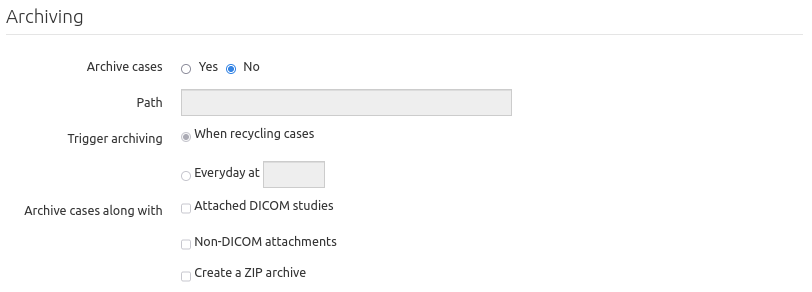
In the Archiving section, indicate whether you wish to archive the cases. If so, specify the path of the folder where they will be archived.
Indicate the mode for launching the archiving:
-
When recycling cases. The case will be archived just before it is deleted from Nexus.
-
Every day If so, specify the archiving time. All the cases that have been updated since the last archiving operation will be archived.
The archive of a case contains at the minimum a PDF export of the information visible from the interface. You can add the DICOM studies and the non-DICOM attachments. Finally, you can choose to create a ZIP archive.
Notifications
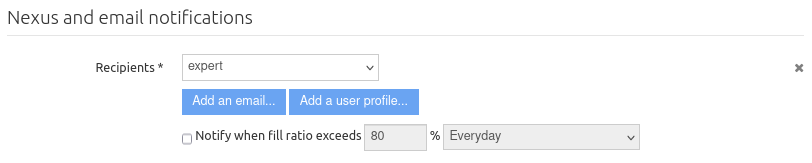
In the Notifications in Nexus and by email section, click Add an address… or Add a profile… to be notified when the high watermark is exceeded and the recycling is not launched, or if you wish to receive a notification as soon as the filling ratio has exceeded a specific watermark. Then enter an email address or select a user profile in the list.
To receive a notification when a watermark is reached, check Notify when filling ratio exceeds, define the filling ratio and how frequently the notification should be sent once the watermark is reached.