
Nexus sends cases to outside destinations according to their priority: urgent cases take priority over routine cases. For example, if routine cases are waiting to be sent and a user sends an urgent case, that case is moved to first position in the waiting list to be sent as top priority.
Nexus can send multiple cases simultaneously and retry to send failed cases.
You can customize the default settings for the number of parallel sendings and recovery attempts based on the capacity of the institution’s network.
To access case sending management, click on Administration in the Runtime quick menu, then on the Nexus tab and on Case sending management.
Customize case sending
Click on the Configure button.
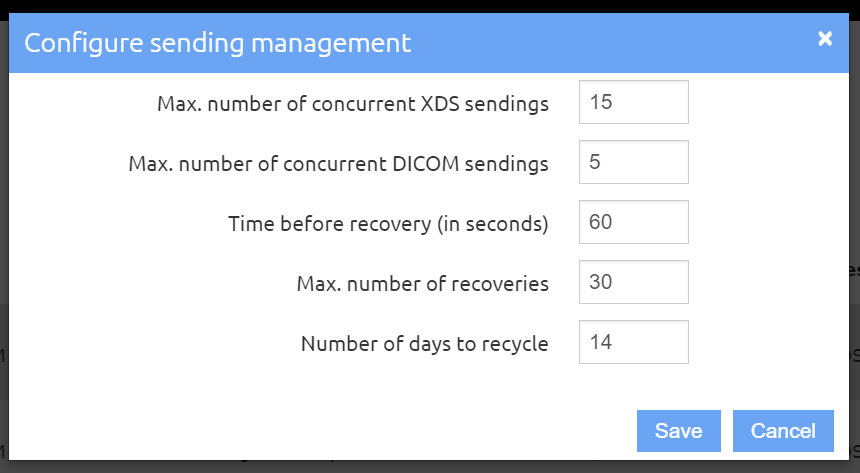
Fill out the following fields:
-
Max. number of concurrent XDS transmissions: XDS channels are used to send case forms.
-
Max. number of concurrent DICOM transmissions: DICOM channels are dedicated to studies and other documents in DICOM format attached to cases.
-
Time before new attempt (in seconds): Waiting period between a sending failure and a new transmission attempt.
-
Max. number of attempts: In the event of a sending failure, maximum number of new attempts.
View the sending list
In the Case sending management page, you can see case sending progress in real time. Sendings are sorted in reverse chronological order. If a case is sent to several destinations, an entry is shown per destination.
You can display all sendings whatever their status, or hide successful and failed sendings.